
Help center › Selling and getting paid
Create estimates and turn them into invoices
An estimate is a quote for your customer. When they accept, it becomes an invoice with the same details.
Create the estimate
- In the menu, tap Estimates, then + New estimate.
- Choose a Registered customer, or type the Customer name if they aren't registered. + New customer adds them on the spot.
- Add the Customer email and Customer phone so you can send it.
- Check the Date and Valid until (15 days by default).
- Under Lines, type a description or a product name (Diego suggests your products and fills in the price), the quantity and the Price. Tap + Add line for more.
- If the customer is tax exempt, check Tax-exempt estimate.
- Add Notes / terms or pick a saved note, then tap Save estimate.
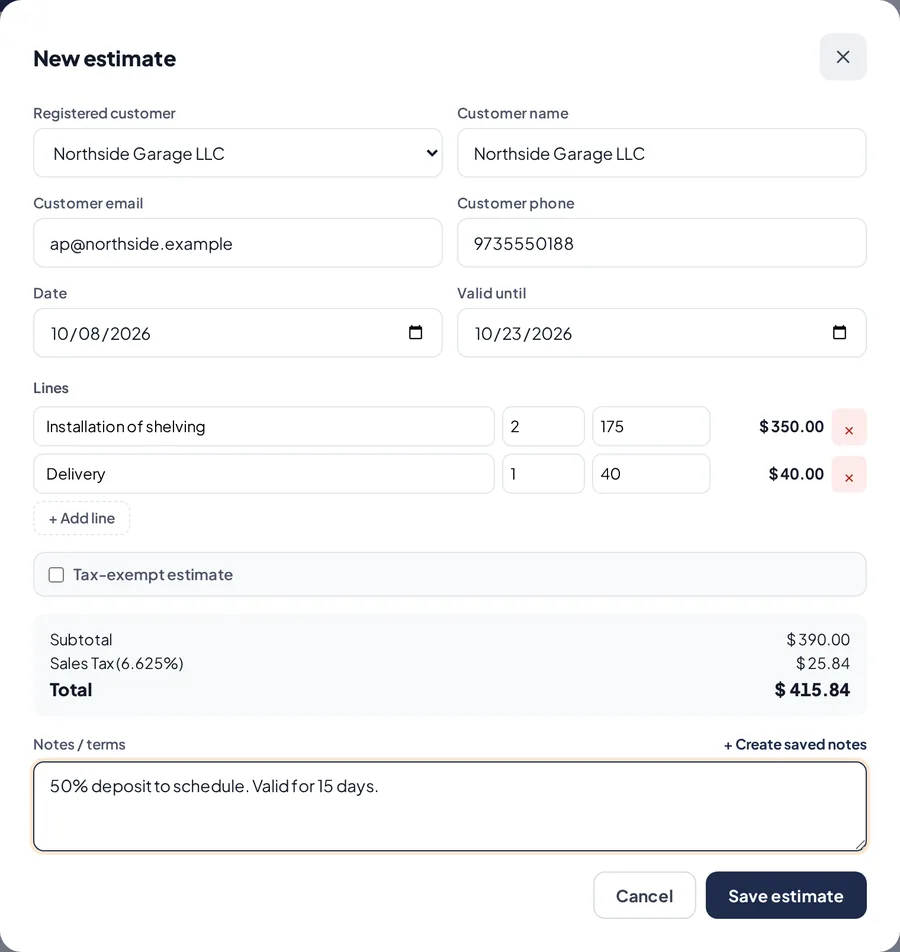
A new estimate.
Send it and follow up
- Tap View on the estimate. You can Print, Send email (the PDF is attached) or send it by WhatsApp.
- Once sent, it moves from Draft to Sent. When the customer says yes, tap ✓ Client accepted.
- Use the filters (Active, Sent, Accepted, Expired, Converted…) to see where each one stands.
Turn it into an invoice
- On the estimate, tap ✓ Convert to Invoice and confirm.
- Diego creates the invoice with the same customer, lines and amounts.
- The estimate is marked Converted and shows the invoice number. You'll find the invoice in Invoices.
Related articles
Create a cash or on-account invoiceCreate invoices paid now or on account with payment terms, and send them by email or WhatsApp.Customers and account statementsAdd your customers, see what they owe and for how long, download their statement as a PDF and remind them by WhatsApp.Send receipts, invoices and reminders by WhatsAppHow to send a sale receipt, an invoice, an estimate or a payment reminder by WhatsApp.
Still have questions?
Write to us and we'll reply within one business day.