
Help center › Selling and getting paid
Create a cash or on-account invoice
Use Invoices when a customer needs a formal invoice or when you sell on account.
Create the invoice
- Go to Invoices and tap + New Invoice.
- Choose the Customer. A customer is required for an on-account sale.
- Under Payment terms, choose Cash sale (paid now; then pick the payment method) or On account (goes to Accounts Receivable).
- On account, choose the Terms (15, 30, 45, 60 or 90 days, or another date). Diego calculates the Due date.
- Under Products, tap + Add, pick the product and quantity. Repeat for each line.
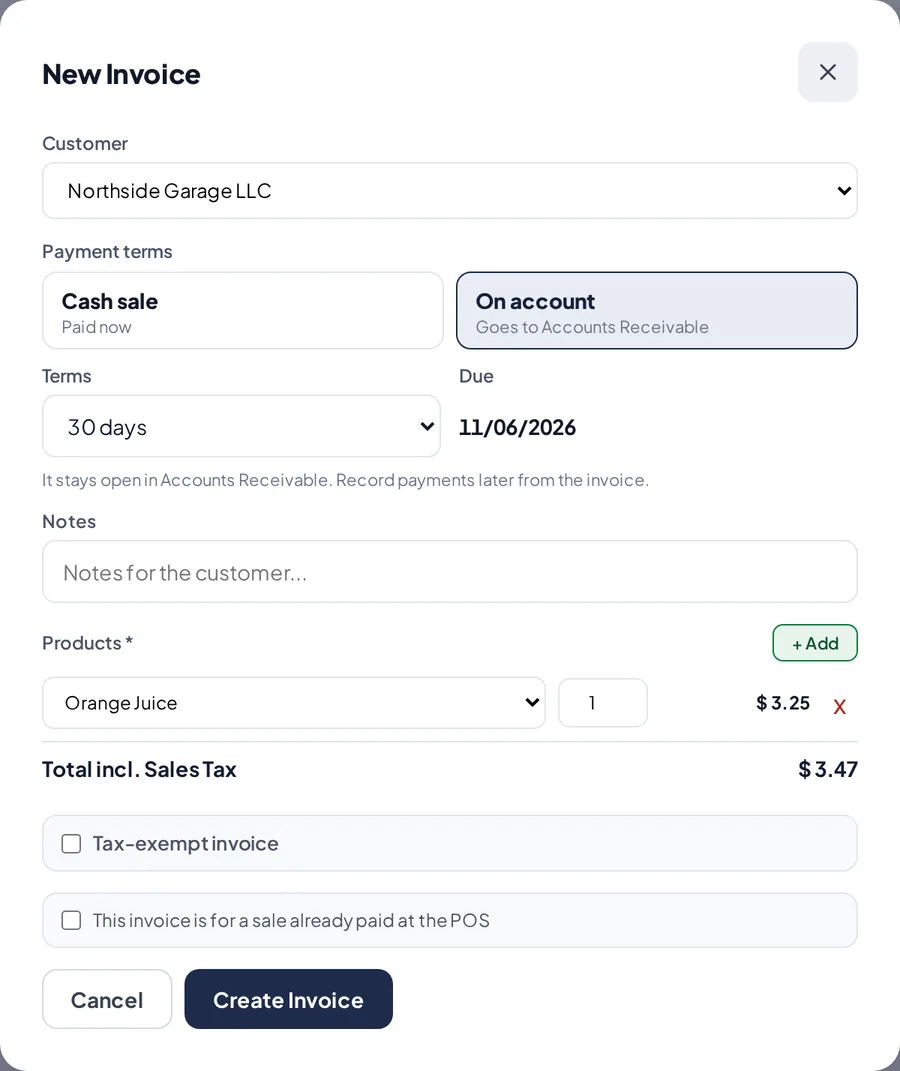
A new on-account invoice with 30-day terms. - For a tax-exempt customer, check Tax-exempt invoice and enter the certificate number.
- Tap Create Invoice.
Send it or void it
- Open the invoice to Print, email it or send it by WhatsApp.
- To void an invoice with no payments, open it and tap the void button.
Related articles
Collect payments from your customersRecord full or partial payments on one or several invoices, with payment method, reference and a receipt for the customer.Set up your business detailsAdd your logo, name, address, EIN, sales tax rate and receipt message so your receipts and invoices show your business details.
Still have questions?
Write to us and we'll reply within one business day.