
Help center › Selling and getting paid
Send receipts, invoices and reminders by WhatsApp
Diego writes the message and opens it in WhatsApp. You just check it and send it. There's nothing to set up.
Where to find the button
- Point of Sale: when a sale is done, tap Send receipt by WhatsApp.
- Invoices: tap WhatsApp on the row or inside View. In Estimates, inside View.
- Customers: on the profile of a customer who owes you, tap Remind by WhatsApp.
- Customers: after 💵 Collect / record payment, tap WhatsApp to send the payment receipt.
Send the message
- A WhatsApp window opens with the customer's number and the message ready.
- Check the Customer's WhatsApp. If the number has 10 digits, Diego adds the 1 in front.
- Edit the Message if you like, then tap Open WhatsApp.
- WhatsApp opens with the message typed in. Tap send there.
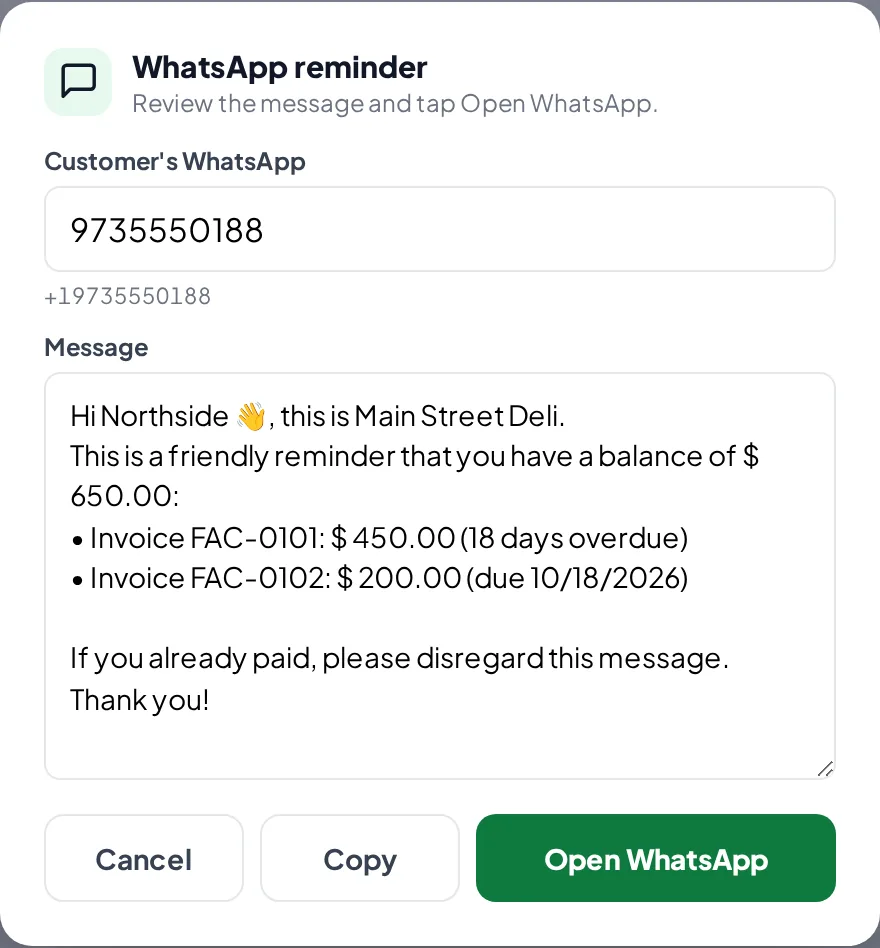
The message before opening WhatsApp.
Related articles
Make a sale at the Point of SaleAdd products, choose the customer and payment method, calculate change and give the receipt on paper or by WhatsApp.Customers and account statementsAdd your customers, see what they owe and for how long, download their statement as a PDF and remind them by WhatsApp.Create estimates and turn them into invoicesCreate estimates for your customers, send them by email or WhatsApp, and turn them into an invoice with one tap when they accept.
Still have questions?
Write to us and we'll reply within one business day.