
Help center › Auto repair shops
Charge, print and send a shop invoice
The Invoices — Shop list shows every order with its vehicle, total and status: Open, Pending (with a balance), Paid or voided.
Take payment
- To collect the full balance, tap Mark Paid, choose the Payment Method (Cash, Card, Check or Zelle) and tap Confirm Payment.
- For a partial payment or a split payment, tap Add Payment. Enter the Amount for each method (+ Add Method adds another) and tap Record Payment.
- If a balance remains, the invoice shows as Pending with what's left.
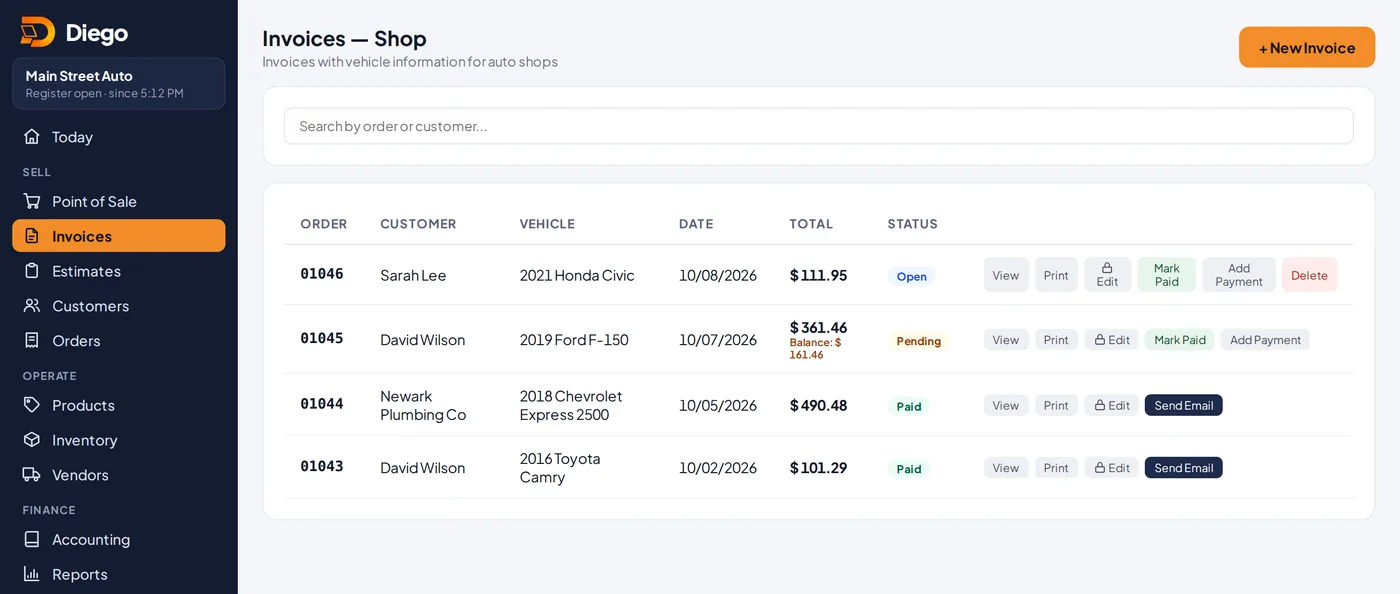
The shop invoice list.
Print or send
- Tap View to see the full invoice with the vehicle, payments and Balance Due.
- Print creates a letter-size PDF with the customer, vehicle, odometer, repair order and notes.
- Send by Email emails the PDF to the customer. WhatsApp prepares a message with the total, amount paid and balance.
Related articles
Create a shop invoice with the vehicleCreate a shop invoice with the customer, their vehicle, the repair order, mileage, parts and labor.Fix a shop invoice with a PINChange a shop invoice with an admin or manager PIN. Who approved it, when and what changed is recorded.Customers and account statementsAdd your customers, see what they owe and for how long, download their statement as a PDF and remind them by WhatsApp.
Still have questions?
Write to us and we'll reply within one business day.