
Help center › Auto repair shops
Fix a shop invoice with a PIN
So nobody changes an invoice without permission, every fix needs a reason and an admin or manager PIN.
Fix the invoice
- In Invoices, tap 🔒 Edit on the invoice.
- Change what you need: the Vehicle, Repair Order, Mileage, lines or Notes. The customer can't be changed; create a new invoice for that.
- Under 🔒 Change authorization, enter the Reason for the change (for example "wrong price") and an Admin or manager PIN.
- Tap Save Changes. You'll see Invoice updated · authorized by and the name.
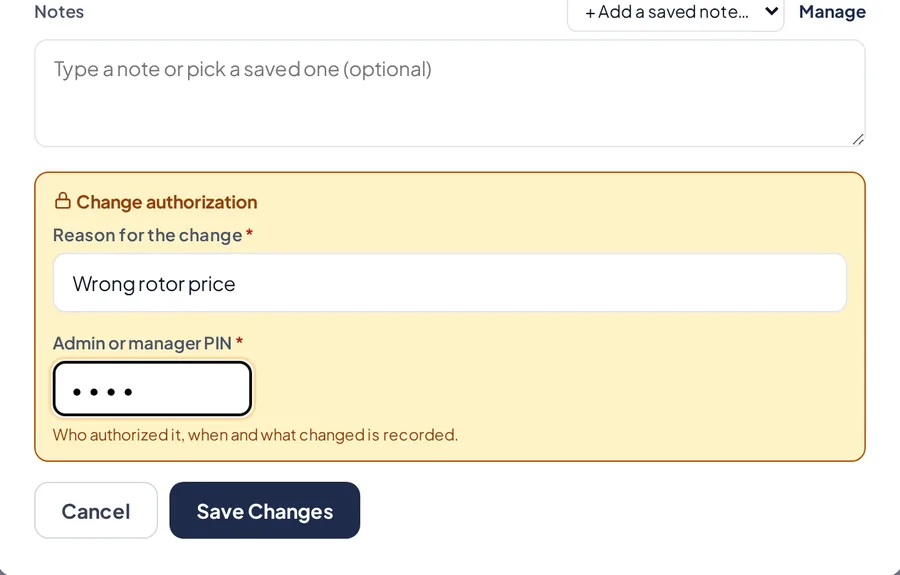
The authorization with reason and PIN.
Paid invoices
- On a Paid invoice, lines and amounts can't be changed anymore.
- You can still fix the vehicle, mileage, repair order and notes.
See the history
- Tap View on the invoice. Change history lists every fix with the date, who approved it, the reason and what changed.
Related articles
Charge, print and send a shop invoiceRecord full or partial payments, print the invoice and send it by email or WhatsApp.Customers and their vehiclesSave each customer's vehicles and fix their details. A fix shows on all their invoices and estimates.Add users, roles and PINsInvite your team, choose what each person can do and give them a PIN to switch cashiers and approve actions.
Still have questions?
Write to us and we'll reply within one business day.