
Help center › Products and inventory
Vendors and deliveries
In Vendors you keep your suppliers and record what they deliver. When you save a delivery, Diego adds the quantities to inventory.
Add a vendor
- In the menu, tap Vendors, then the Vendors tab and + New Vendor.
- Enter the Vendor name, Contact person, Tax ID, Phone, Email and Notes (for example, delivery days).
- Tap Create Vendor.
Record a delivery
- On the Deliveries tab, tap + New Delivery.
- Choose the Vendor, the Delivery date and the Invoice / reference number.
- Tap + Add product for each product: pick the product, the Qty, and check the cost.
- Tap Record Delivery. You'll see that inventory was updated.
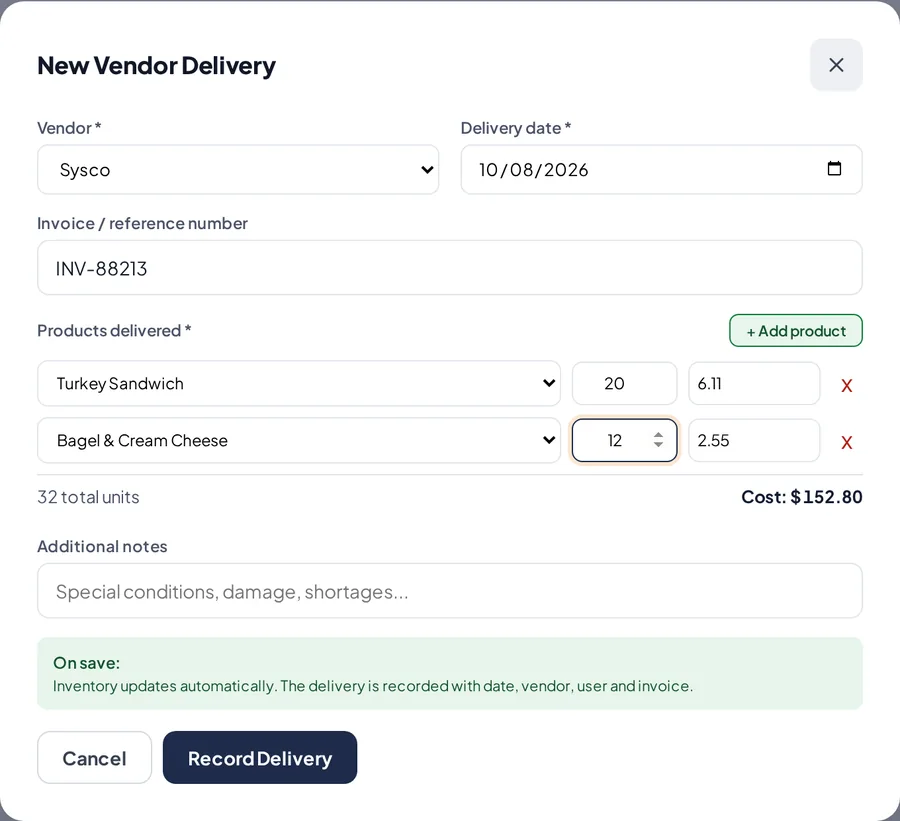
A vendor delivery.
Related articles
Check your inventory and adjust it with a PINSee which products are low or out of stock, and fix a quantity with a reason and a manager's PIN.Accounting for US businessesRecord expenses, vendor bills and owner transactions, and export everything ready for QuickBooks.Create and edit productsAdd your products with price, cost, category, barcode, photo and sales tax, and choose whether Diego tracks their stock.
Still have questions?
Write to us and we'll reply within one business day.