
Help center › Reports and accounting
Accounting for US businesses
Accounting helps you keep track of expenses and hand everything to your accountant ready for QuickBooks.
Record an expense
- In the menu, tap Accounting, then the Expenses tab.
- Tap + New expense. Enter the date, amount, vendor, category, what you paid with and the receipt number.
- Tap Save expense. To fix it, tap Edit; to remove it, Void.
- If a vendor gives you money back, tap + Vendor refund instead. See Vendor refunds and credit memos.
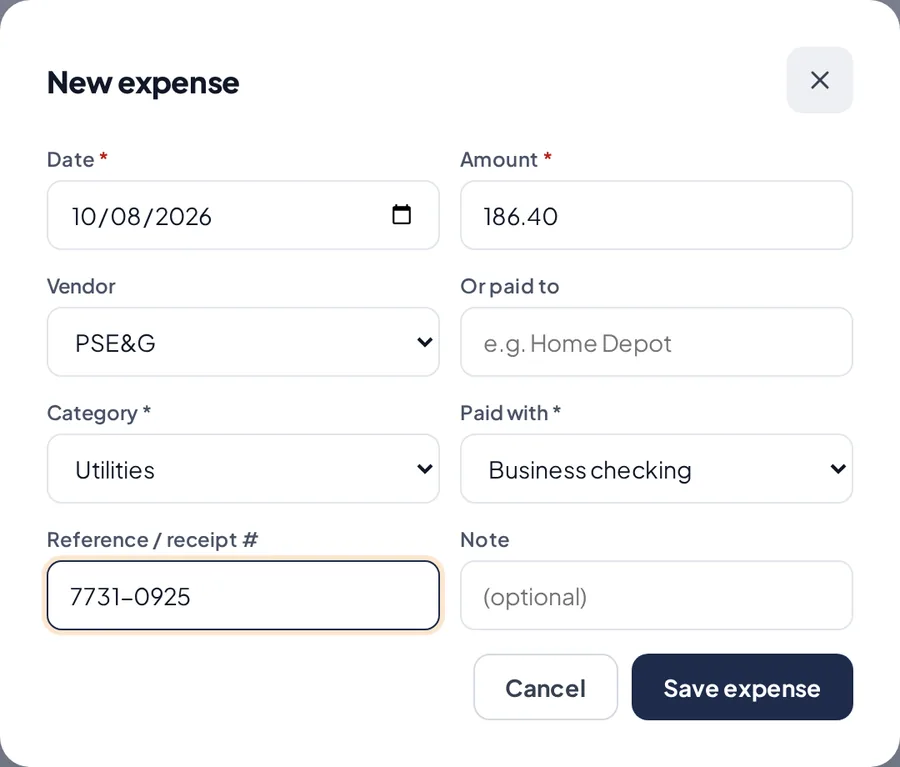
Recording an expense.
See your numbers
- Summary: net sales, expenses, estimated profit, tax collected, accounts payable and tips.
- Profit & Loss and Cash Flow for any period.
- You can also track Accounts Payable, Vendors, Sales Tax, Owner Transactions and Mileage.
Export to QuickBooks
- Tap ⬇ Export to QuickBooks, choose the period, and download the journal entries CSV or the full Excel workbook.
Related articles
Vendor refunds and credit memosRecord money a vendor gives back to you, and give a customer a credit or refund on an invoice.Sales reportsSee your sales by day, payment method, product and user. Download to Excel or CSV, or get the report by email every day.Vendors and deliveriesSave your vendors and record each delivery. Inventory goes up on its own.
Still have questions?
Write to us and we'll reply within one business day.