
Help center › Reports and accounting
Sales reports
Reports sums up your sales for any period you choose.
Choose the period
- In the menu, tap Reports.
- Choose Today, Week (last 7 days), Month (last 30 days) or Custom with two dates and Apply.
- Under User you can see a single cashier's sales.
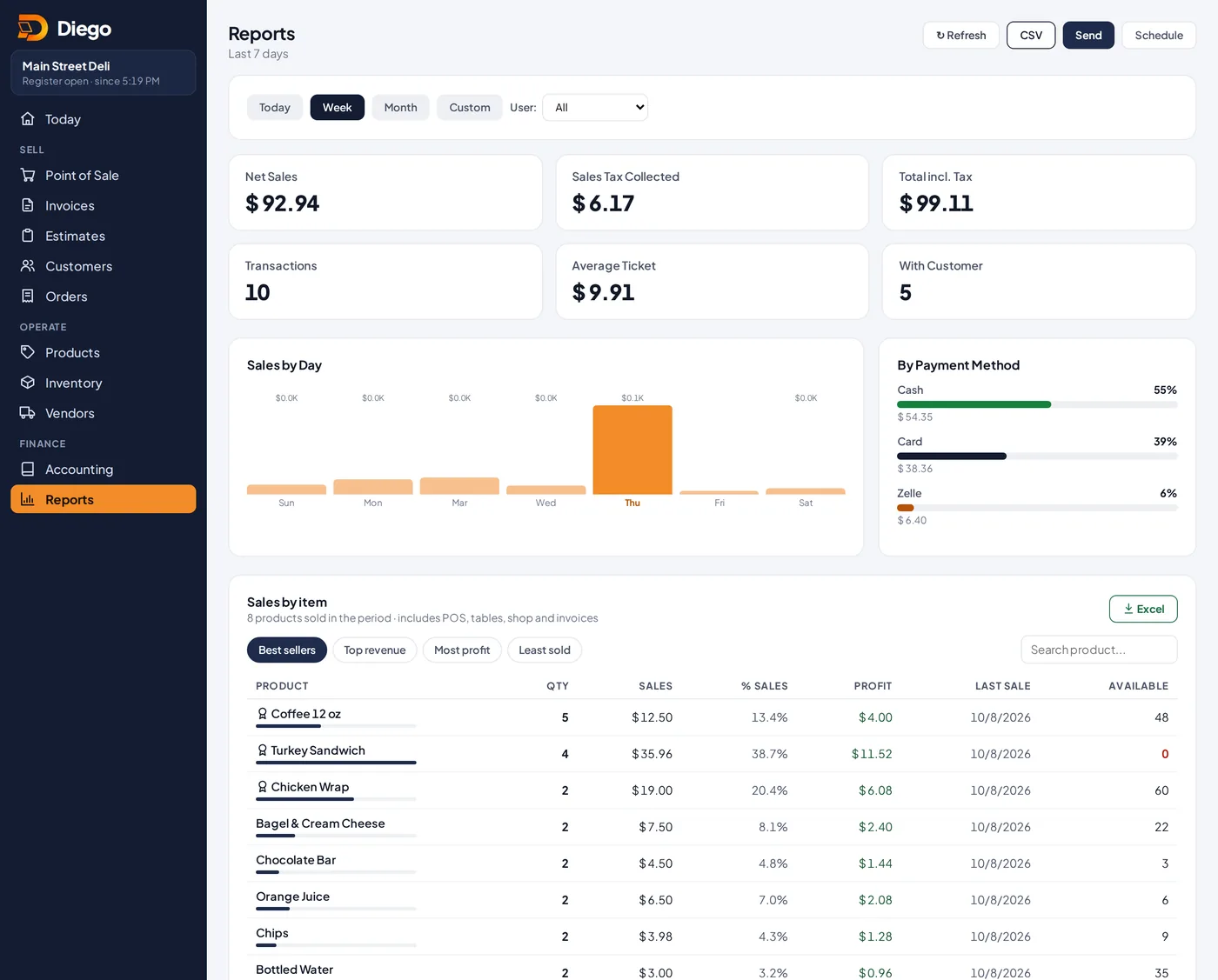
The weekly sales report.
What you'll see
- At the top: Net Sales, Sales Tax Collected, Total incl. Tax, Transactions, Average Ticket and sales With Customer.
- Sales by Day and By Payment Method (cash, card, Zelle).
- Sales by item: sort by Best sellers, Top revenue, Most profit or Least sold. Products with no sales are listed below.
- Sales by User, Tax Breakdown and Recent Orders.
Download or send
- CSV: download one row per sale.
- ⬇ Excel under Sales by item: download sales by product.
- Send: email the summary. Schedule: get the report every day at the time you choose.
Related articles
The Today screen: how your business is doingWhat each number on the Today screen means: sales, transactions, cash in drawer, overdue invoices and what needs attention.Drawer status and shift historySee how much cash should be in the drawer right now, and review the last 30 days of cash counts.Create and edit productsAdd your products with price, cost, category, barcode, photo and sales tax, and choose whether Diego tracks their stock.
Still have questions?
Write to us and we'll reply within one business day.