
Help center › Restaurants
Takeout and delivery at the Point of Sale
For restaurants, the Point of Sale asks for the order type before charging.
Make the sale
- In Point of Sale, add items as usual.
- In Current order, choose 🍽️ Dine in, 🥡 Takeout or 🛵 Delivery.
- For Delivery, enter the Customer name, Phone and Delivery address. If the customer is saved and you change their address, choose Just this once or Save to customer.
- Charge as usual. The delivery details print on the receipt.
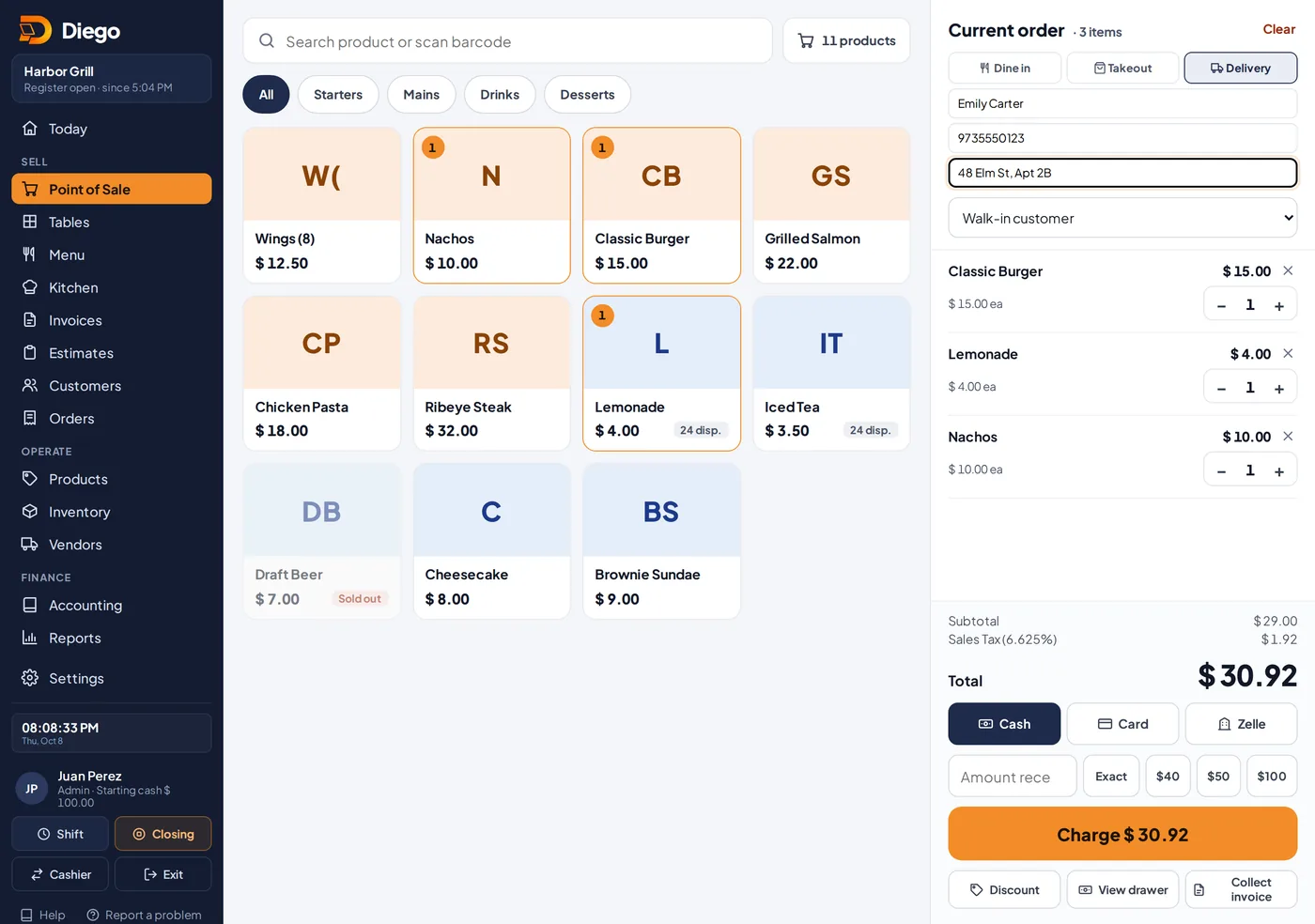
Choosing the order type at the Point of Sale.
Related articles
Make a sale at the Point of SaleAdd products, choose the customer and payment method, calculate change and give the receipt on paper or by WhatsApp.Charge a table: full check, by seat and tipCharge the full check or by seat, add the tip and choose the payment method.Sales reportsSee your sales by day, payment method, product and user. Download to Excel or CSV, or get the report by email every day.
Still have questions?
Write to us and we'll reply within one business day.