
Help center › Selling and getting paid
Authorized discounts with a PIN
Discounts can only be applied with a Manager or Admin PIN, and Diego records who approved each one.
Set up your discounts (Admin)
- Go to Settings → Security → Authorized discounts.
- Enter a name (for example “Frequent customer”) and a percentage. Add more as needed (up to 20).
- Save the discounts. The Point of Sale will only show these.
Apply a discount to a sale
- With the order ready in the Point of Sale, tap Discount.
- Pick one of the Authorized discounts.
- A manager or admin enters their Manager / Admin PIN and taps Apply Discount.
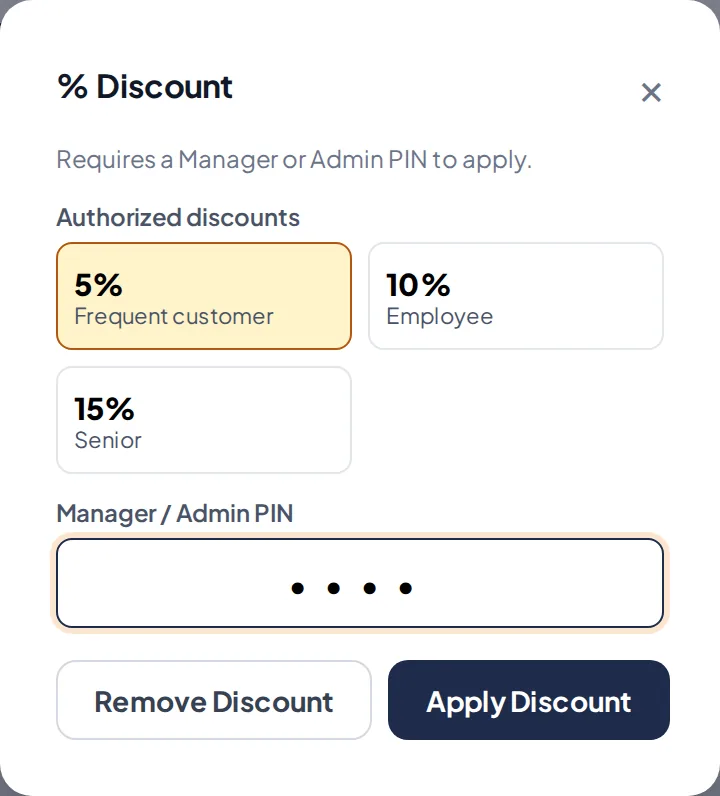
Choose the discount and approve it with a PIN. - The discount applies to the whole order and shows in the total with the name of the person who approved it.
Related articles
Still have questions?
Write to us and we'll reply within one business day.